The Blog
The official blog of Schuyler Martin View the archive
Mood Switch: A Persistent Music Player
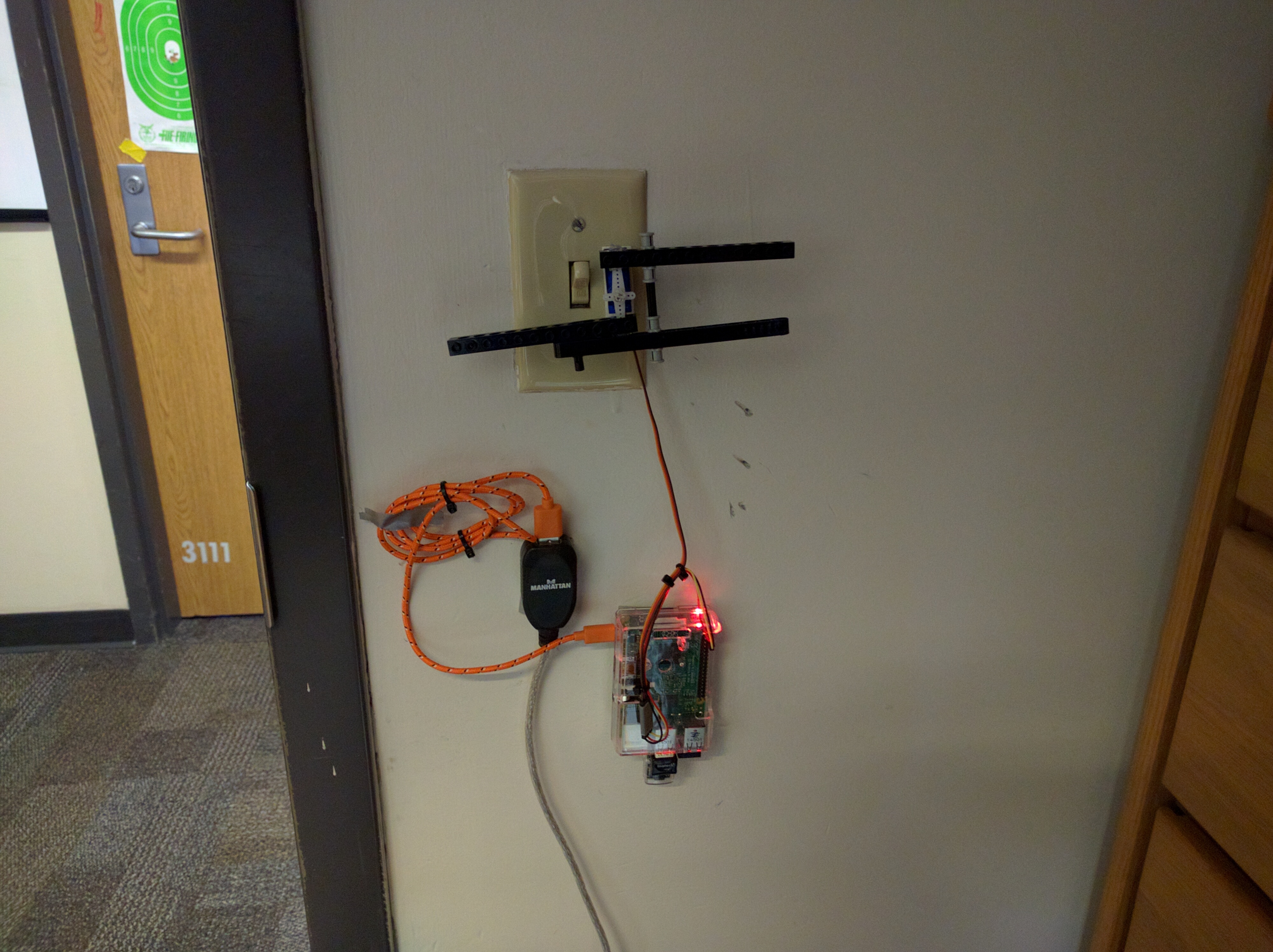
Mood Switch is a project I have been working on for the past month or so.
I bought myself an amp for Christmas with bluetooth connectivity so I could wirelessly play music off of my phone.
When I opened the box I was surprised to find that it came with a remote control.
That got me thinking: wouldn't it be a lot easier if I just had music playing on a device at all times?
That way I could have music playing with a couple of button clicks instead of having to fiddle around setting up streaming on my phone every time I got out of the shower or wanted to listen to music before going to bed.
The project is mostly written in Python but there are a couple of bash scripts that wrap the Python code to help daemonize the program.
These scripts are set to run when the Pi boots-up and can start/stop/restart the process as needed as well as restart the streaming program in the event that bluetooth connectivity is lost (which occurs more frequently in the dorms than when I was testing Mood Switch in my house over break).
It is designed to persistently play music for the ease of use of the end user.
The reason I chose to write this in Python is because I initially wanted to stream Google Music to the Pi and the most complete unofficial Google Music API available right now is written in Python.
I managed to authenticate with the Google Music service by tricking it into thinking the Pi was my old Android tablet.
Although the service would give me song and playlist information in the form of JSON payloads, the streaming locations it would provide where always unavailable.
Out of this failure, I reworked the music playback system to be more generic.
Right now I have two plugins written, one for local music playback and one to handle OGG online radio streams.
These services provide the music playback system with available playlists and each playlist consists of streaming information per song (the radio service provides one stream per playlist/station).
Current music state information, such as the currently playing playlist and shuffle state are broadcast over the speakers via a text-to-speech synthesized voice.
The TTS program I use is slow so I generate the speech files as needed when the playback program initializes and all speech files are cached to the Pi's storage and are played on state change.
It is worth noting that I initially wanted Mood Switch to control the light switch in my room via the remote as well.
As of writing, the light switch feature is only partially implemented.
I have a test script that can move the servo on the Raspberry Pi.
However there were a few issues:
- The servo I purchased did not have enough torque to turn the light switch.
- When run as a background process/daemon, the Pi throws a GPIO exception indicating that access to the GPIO pins are not available. This does not happen if I run the program manually and indicates that the Pi prevents such access to the GPIO board for security concerns. I'm not sure if there is much I can do at this point to resolve this.
- I instinctively keep slapping the servo mechanism off the wall every time I enter the room to turn on the light, which makes this feature seem kind of dumb now.
For further details, see GitHub.
Awesome Mix Volume 1: Making a Cassette MP3 Player
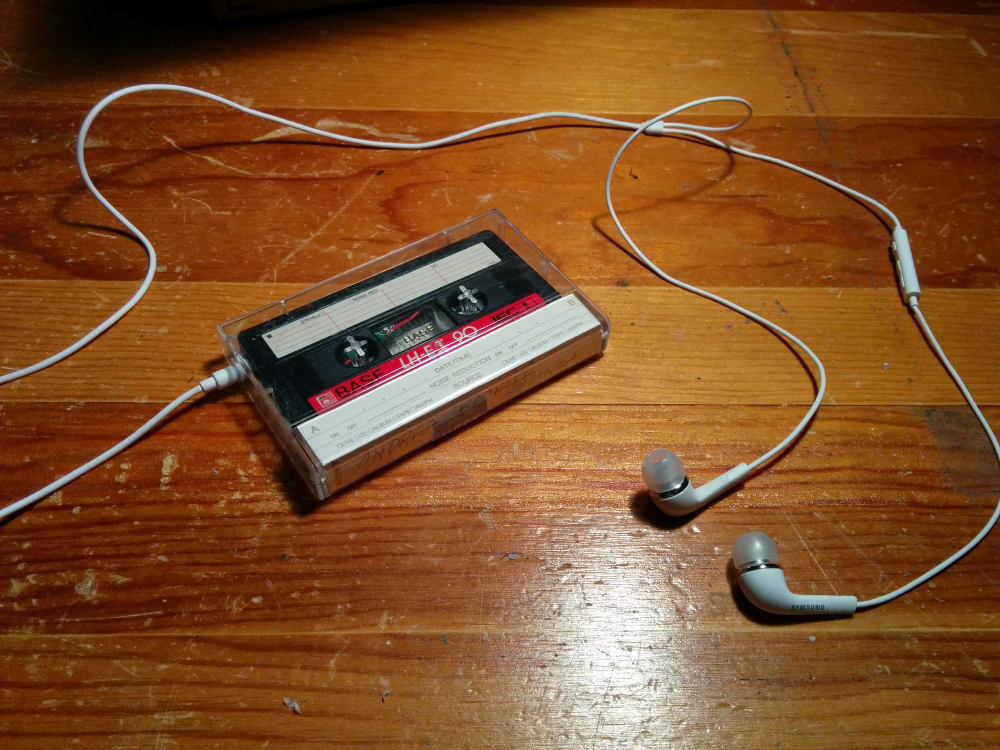
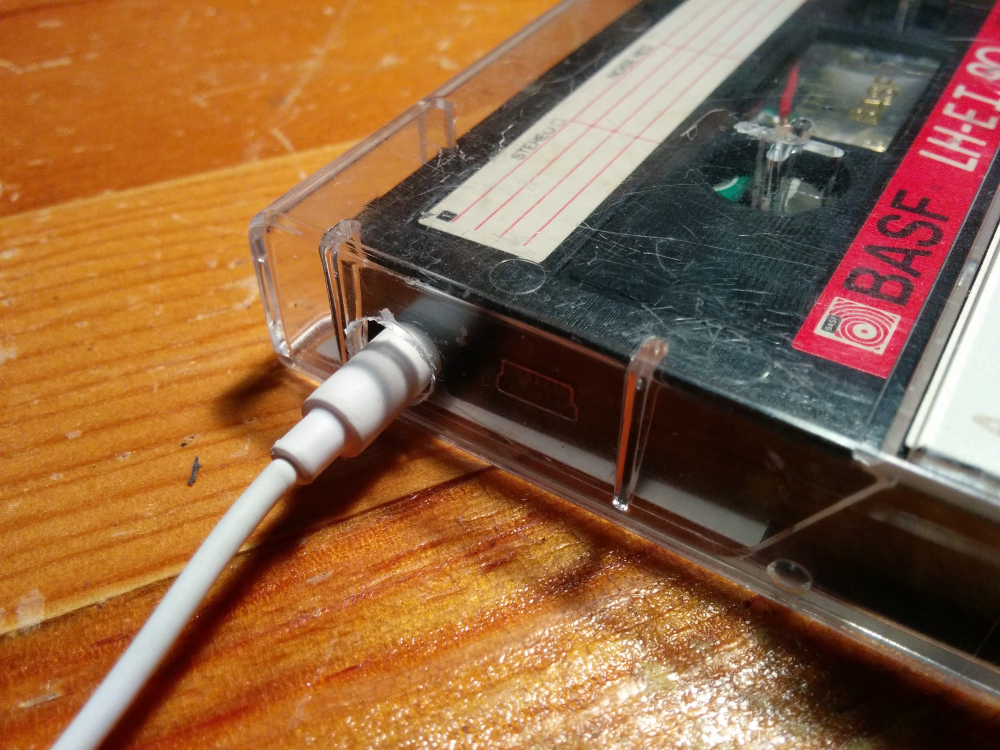
After watching Guardians of the Galaxy the other day I came across this on the internet and decided to attempt to make my own cassette mp3 player.
My version is fairly similar to the original but I made my own modifications to the design:
- I used 28-guage insulated copper wire instead of enamled wire
- I did not move the audio and usb ports. Instead I cut a small whole out on the front face to make room for the audio jack
- I replaced the original battery with one from a model RC Helicopter that can be replaced easily
Intro to Go: The Shakesspeare's Monkey Problem
A few weeks ago I had a conversation with a friend of mine about Go, the new
C/Python-esk language put out by Google. It sounded like an interesting
langauage with well thought-out thread support so I thought I would give it
a try.
So I started writing-up a simple simulation of the "Shakespeare's Monkey
Problem": how long would it take a series of monkeys with typewriters to
produce the works of Shakespeare? In my implementation, a series of threads
will produce random character strings (to simulate the monkeys) until one
thread has produced the provided string. To further simplify the problem,
the "monkeys" will know how long the string should be so the monkey's
"manager" won't have to continually check the monkey's work.
The project isn't completed yet, but the basic source code is up. I'll continue
to work on it through-out the semester.
The Shakespeare's Monkey Project is available here:
GitHub
Blog Preprocessor
I've made significant improvements to the blog system over the past few weeks. Now, instead of having to add a new blog post manually every time (or caving-in and using WordPress), I've written a Python script to preprocess blog posts from specially formated text files. These text files (which I call .post files) specify the title of the post in first line, the date in the second (which is optional), and the blog text proceeding that. If the date is not specified, it can be derived from the .post file's creation date. Once these post files are read-in, the preprocessor recreates the primary blog page, the archive page, and a series of permalinked pages. The primary blog page gets populated with the 4 latest blog posts while the archive page stores a sorted list of links to all the previous "permalinked" blog posts.